Remote Diagnostics
The remote diagnostics service refers to the act of running a diagnostic on a vehicle remotely. This service allows, amongst other features, to take measurements on the car at high frequencies (1Hz) for long periods of time (several hours).
This tutorial presents a full workflow example demonstrating how to acquire measurements of the following features in a continuous manner.
- Battery Pack Soc
- Battery Pack charge current
- Battery Pack current
- Battery Pack voltage
- Mileage
- Battery Pack temperature
- Hybrid vehicle Battery Pack temperature
- Charge cable status
- Outdoor temperature
- BMS SOHC
- Charge or energy counter
- Charging port state
- Max Cell SOC
- Min Cel SOC
- Max Cell Voltage
- Min Cell Voltage
- Battery Cumulative Current (Throughput)
- Battery Cell 1 Voltage
Prerequisites
The following actions must be performed prior to the acquisition.
- Sign up to connect.munic.io.
- Access to devices registered to the platform in question.
Glossary
RD: Acronym for remote diags, short for remote diagnostics.
VCI (Vehicle Communication Interface): The diagnostic device traditionally plugged directly to the vehicle.
Virtual VCI: Remote diag using one MUNIC dongle on the vehicle, connected to a virtual VCI on the cloud (also called “VVCI mode”).
Tunnel: Encrypted communication channel, dedicated to RD data, between MUNIC devices and the virtual VCIs on the cloud.
Getting started
This section demonstrates how to initiate a remote diagnostics session in order to execute different supported actions and monitor their results.
- Session Status
- Check session status
- Check session actions status
- Session Setup
- Create a session
- Check if device is connected
- Check cloud
- Start a session
- Check if device is moving
- Tunnel connection establishement between device and VVCI
- Vin Validation
- Should Validate Vin
- Manual Vin validation
- Create a session
- Action Management
- Action Request Vehicle Vin
- Request Vehicle Vin
- Action Identification
- Request supported parameters
- Action Measurement
- Read live parameters
- Stop action
- Action Request Vehicle Vin
- Session Close
Note
The following guide takes provider03 as reference, supported actions and
minor details may differ when using another provider.
Session Status
This operation, if executed after having launched the measurements, is also used to obtain the time series
| |
| |
| |
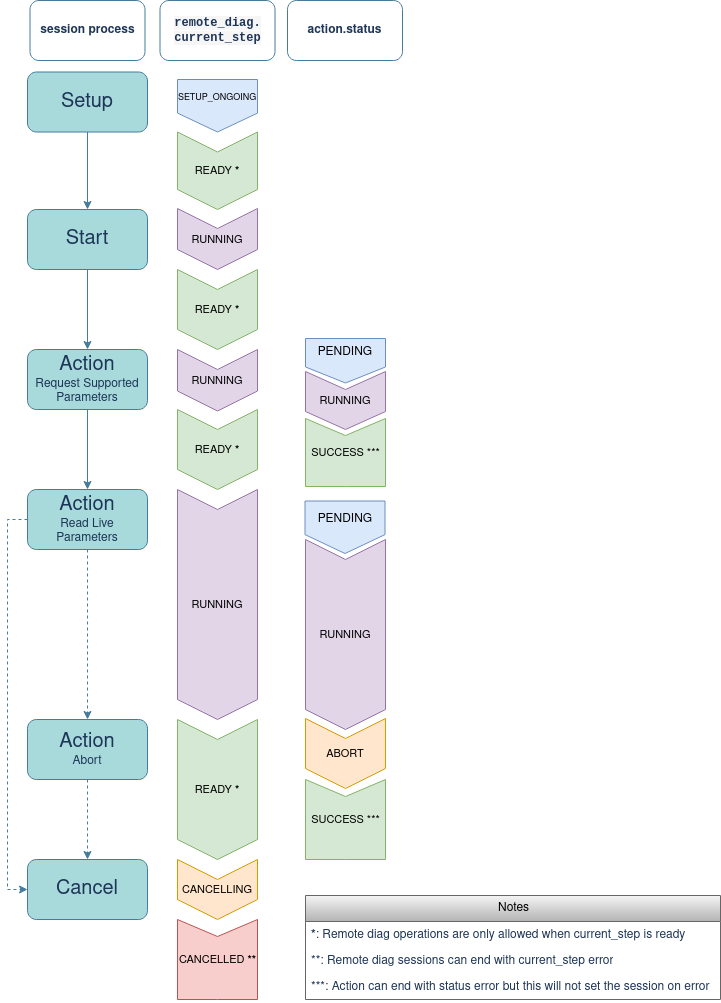
Remote Diagnostic current step and Action Status
Filters
Preferred Signal
Each measured signal, depending on the model, may have several alternatives
originating from different ECUs. The quality of such signals is not guaranteed
to be equal which is why the boolean field preferred is defined to designate
the signal with the best quality.
The result of the status can be filtered using this field, set to either true
or false.
In the following example, the chargeLevel001 signal is preferred over the
other chargeLevel signals.
| |
| |
| |
Session Setup
A remote diagnostic session is setup for a given device as follows.
Create Session
A session is defined by the following variables.
- imei id: The device IMEI.
- provider name: The provider name, provider_03 for this use case.
Once successfully created, a remote diagnostics ID is returned to be passed as a parameter to all subsequent commands.
| |
| |
| |
Note
The user must ensure that they are authorized to operate on the device used
for this session or else, a 106 Asset not found error will be raised.
Note
The device must be connected to the cloud before a session is created.
Otherwise, a 200 Device is disconnected error will be raised.
Keep in mind that the device may take some time to setup its communication with the cloud, up to a few minutes.
Create session answer
Once the session is created, the status must be monitored until it is ready to proceed to the next operation.
{
    "current_step": "READY",
    "id": "927114178235564039"
}
Start Session
This operation sets up a secure communication tunnel between the device and the VVCI. The following variables are defined.
- imei id: The device IMEI.
- Remote diagnostics ID: The ID of the recently created session.
- vin: The Vehicle identification number (VIN) of the associated vehicle, 17 characters long.
| |
| |
| |
Note
The variable vin is optional.
Start Session answer
Once the session is started, the status must be monitored until it is ready to proceed to the next operation.
{
    "current_step": "READY",
    "id": "927114178235564039"
}Vin Validation
The vin validation is possible according to 2 scenarios:
- Should Validate Vin: is an automatic process.
- Manual Vin validation: is a completely manual process.
Should Validate Vin
In this scenario the vin given by user will be automatically compared to the vin detected on the vehicle. The action Request Vin Vehicle is also automatically launched.
| |
| |
| |
Note
Any other result than equality between VIN detectected by vehicle equals vin given by user will produce a session error.
The progress of vin validation can be tracked with this status.
Possible errors are:
- UNABLE_TO_RETRIEVE_VIN_FROM_VEHICLE
- VIN_READ_FROM_VEHICLE_MISMATCH_WITH_ANNOUNCED_VIN
{
    "vud": {
        "device": {
            "id": "863609060285362"
        },
        "vin": "WVWZZZE14PP000000",
        "vin_from_vehicle": "",
        "failure_code": 502,
        "failure_reason": "UNABLE_TO_RETRIEVE_VIN_FROM_VEHICLE",
    }
}
{
"vud": {
"device": {
"id": "863609060285362"
},
"vin": "WVWZZZE14PP000000",
"vin_from_vehicle": "WVWZZZE14PP000123",
"failure_code": 503,
"failure_reason": "VIN_READ_FROM_VEHICLE_MISMATCH_WITH_ANNOUNCED_VIN",
}
}Manual Vin Validation
In this scenario the vin validation is made by the user.
- Start the session
- Start Request Vehicle Vin
- Manually compare vin_read_from_vehicle with vin
- If the 2 vin are not the same the user can restart or continue the session. If the session continue the vin will be used for all this session.
Action Management
This section documents in details how to start, monitor and stop an action. The
following two actions are available for the previously specified provider,
provider03.
- REQUEST_VEHICLE_VIN
- REQUEST_SUPPORTED_PARAMETERS
- READ_LIVE_PARAMETERS
Action Request Vehicle Vin
This action is used to request the vin detected by the vehicle The progress of request vehicle vin can be tracked with this status.
| |
| |
| |
Action identification
This action is used to identify the supported parameters that can be measured on the vehicle
The variables used are :
- imei id: The device IMEI.
- Remote diagnostics ID: The ID of the recently created session.
- Action: “REQUEST_SUPPORTED_PARAMETERS”
The progress of identification can be tracked with this status.
| |
| |
| |
Identification answer
The identification process may a few minutes, up to 5 minutes, depending on the vehicle. The process is considered done when the progress is equal to 100%.
The supported parameters can be found in the status answer.
For exemple:
{
    "type": "REQUEST_SUPPORTED_PARAMETERS",
    "name": "odometer",
    "readings": {
        "relative_timestamps": [],
        "values": []
        },
    "unit": "KILOMETER",
}Action Measurements
This action is used to start continuous measurement of the selected parameters by defining the following variables.
- Remote diagnostics ID: The ID of the associated session.
- Action: “READ_LIVE_PARAMETERS”
- pids_names: The list of requested parameters for measurement.
| Signal Name | Feature Name |
|---|---|
| chargeLevel | Battery Pack Soc |
| battery_charge_a | Battery Pack charge current |
| battery_current | Battery Pack current |
| batteryVoltage | Battery Pack voltage |
| odometer | Mileage |
| battTemp | Battery Pack temperature |
| hybridBatterTemp | Hybrid vehicle Battery Pack temperature |
| chargeCable | Charge cable status |
| outdoor_temp_cel | Outdoor temperature |
| batt_soh | BMS SOHC |
| battery_charge_w | Charge or energy counter |
| chargeState | Charging port state |
| max_cell_soc | Max Cell SOC |
| min_cell_soc | Min Cel SOC |
| max_cell_voltage_v | Max Cell Voltage |
| min_cell_voltage_v | Min Cell Voltage |
| battery_cumulative_current | Battery Cumulative Current (Throughput) |
| battery_cumulative_charge_current | Battery Cumulative Charge Current (Throughput) |
| cell_1_voltage_v | Battery Cell 1 Voltage |
The Measurement can be found in the action status.
| |
| |
| |
Note
The execution of REQUEST_SUPPORTED_PARAMETERS action is required prior to this one.
Live parameters measurement answer
Once the live parameter action is started, the progress is stuck at 99% until the either action or the session is stopped.
The relative timestamps are give in milliseconds (ms).
For each feature, one or more signals may exist. As a result, the naming
convention is to add 00X at the end of each name, without the transition
character where X increments for each signal found. For example, for 3
odometer signals, the following names are used.
- odometer for the first signal found.
- odometer001 for the second one.
- odometer002 for the third one.
Note
The signals are sorted by the order of which they were discovered.
And the following time series describes them.
{
    "supported_parameters": {
        "list": [
            {
                "id": "927348564864073735",
                "name": "odometer",
                "preferred": false,
                "readings": {
                "relative_timestamps": [
                        0.0,
                        1037.0,
                        2020.0,
                        3020.0,
                        4021.0,
                        5021.0,
                        6022.0,
                        7021.0,
                        8021.0,
                        9020.0,
                    ],
                    "values": [
                        1.25e4,
                        1.25e4,
                        1.25e4,
                        1.25e4,
                        1.25e4,
                        1.25e4,
                        1.25e4,
                        1.25e4,
                        1.25e4,
                        1.25e4,
                        1.25e4
                    ]
                },
                "unit": "KILOMETER",
                "unit_name": "kilometer"
            },
            {
                "id": "927348564864073743",
                "name": "odometer001",
                "preferred": true,
                "readings": {
                "relative_timestamps": [
                        0.0,
                        1038.0,
                        2020.0,
                        3021.0,
                        4021.0,
                        5022.0,
                        6023.0,
                        7021.0,
                        8021.0,
                        9021.0,
                    ],
                    "values": [
                        1.25e4,
                        1.25e4,
                        1.25e4,
                        1.25e4,
                        1.25e4,
                        1.25e4,
                        1.25e4,
                        1.25e4,
                        1.25e4,
                        1.25e4,
                        1.25e4
                    ]
                },
                "unit": "KILOMETER",
                "unit_name": "kilometer"
            }
        ]
    }
}Stop Action
| |
| |
| |
Session Close
Stop Session
This operation will stop a session given its ID, if not already stopped. Note that stopping a session will automatically stop all ongoing actions associated to it. The following variables are defined.
- imei id: The device IMEI.
- Remote diagnostics ID: The ID of the associated session.
| |
| |
| |
Stop session answer
Once the session is stopped, its status is set to
cancelling. The status will be updated to cancelled if the device is
successfully disconnected from the remote diagnostic session communication else
to error failing that.
{
    "current_step": "CANCELLED",
    "id": "927114178235564039"
}
Note
A new session can be created once the status of the current one is set to cancelled or error.
Note
If a new session is requested while the current one is still in progress, a “108 previous session not closed“ error will be raised.